Nushell Niceties: Display Text With Gradients
In Nushell you can use the ansi gradient command to display text with a color gradient. You need to write a pipeline where the text that you want to be in a gradient first and then after the pipe (|) symbol use the ansi gradient command. The command accepts several flags to define for example the start and end colors of the gradients for the foreground and background. The value of the color is a hexadecimal value. Nushell also supports named themes with predefined gradients that can be used as foreground and/or background of the text. All these flags can also be combined together to have a colorful output.
In the following examples the ansi gradient command is used with a combination of flags. First see how the gradient can be defined using only foreground start and end color values. Nushell will assume the color black if a start or end value is missing.
('Fancy Nushell ANSI output' |
  ansi gradient
    --fgstart 0xFF00FF
    --fgend 0x800000)
The shorthand for --fgstart is -a and for --fgend is -b:
('Fancy Nushell ANSI output' |
  ansi gradient
    -a 0xFF00FF
    -b 0x800000)
In the following example the gradient is defined for the background:
('Fancy Nushell ANSI output' |
  ansi gradient
    --bgstart 0xFF00FF
    --bgend 0x800000)
The shorthand notation for --bgstart is -c and --bgend is -d:
('Fancy Nushell ANSI output' |
  ansi gradient
  -c 0xFF00FF
  -d 0x800000)
It is also possible to use foreground and background flags together:
('Fancy Nushell ANSI output' |
  ansi gradient
    --bgstart 0xFFFFFF
    --bgend 0x800000
    --fgstart 0x800000
    --fgend 0xFFFFFF)
('Fancy Nushell ANSI output' |
  ansi gradient
    -c 0xFFFFFF
    -d 0x800000
    -a 0x800000
    -b 0xFFFFFF)
Nushell has built-in themes with gradients. You can use the flag --list or -l to see all the themes with an example of the gradient:
ansi gradient --list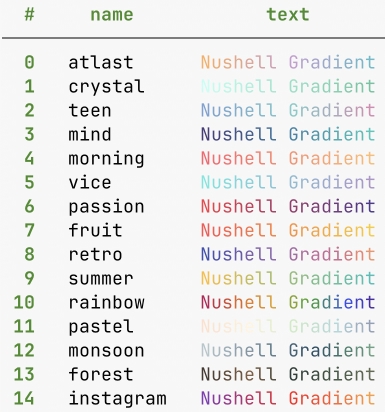
The next example shows usages of themes for foreground and background gradients. First we use the flag --fgnamed followed by the name.
('Fancy Nushell ANSI output' |
  ansi gradient
  --fgnamed rainbow)
We get the same result with the short option -F:
('Fancy Nushell ANSI output' |
  ansi gradient
  -F rainbow)
To use a named theme as background gradient you can use the flag --bgnamed:
('Fancy Nushell ANSI output' |
  ansi gradient
  --bgnamed rainbow)
Or use the short option -B:
('Fancy Nushell ANSI output' |
  ansi gradient
  -B rainbow)
You can also combine both options to use a theme for the foreground and background gradient:
('Fancy Nushell ANSI output' |
  ansi gradient
  --fgnamed forest
  --bgnamed fruit)
Or use the short options:
('Fancy Nushell ANSI output' |
  ansi gradient
  -F forest
  -B fruit)
Written with Nushell 0.117.0.
