Battle-testing Temporal - Part 3
In part 3 of this series about Temporal it is finally time to explore cross-workflow creation, communication & orchestration. Upgrading the poker use-case from single-table to supporting multi-table tournaments of arbitrary size.
Diving into:
-
How to spawn child workflows and their intended behavior
-
Using signals to communicate between workflows
-
Set up a Tournament workflow orchestrating Table workflows
Spawning Child workflows
From inside any workflow it is possible to create and start child workflows.
This is done by creating a specific type of workflow stub using Workflow.newChildWorkflowStub, which takes a slightly augmented set of options.
String tableWorkflowId = String.format("%s-%d", tournamentId, tableNumber);
ChildWorkflowOptions options = ChildWorkflowOptions.newBuilder()
        .setTaskQueue("all_tables")
        .setWorkflowId(tableWorkflowId)
        .setParentClosePolicy(ParentClosePolicy.PARENT_CLOSE_POLICY_ABANDON) // specific for childs
        .build();
TableWorkflow tableWorkflow = Workflow.newChildWorkflowStub(TableWorkflow.class, options);
While PARENT_CLOSE_POLICY_ABANDON sounds ominous, what it means is that when the workflow that started the child workflow is done, the child workflow will be left alone and thus continues to run.
Other options would be to directly terminate it or request a cancellation upon completion of the parent workflow.
The tableWorkflow represents the stub, but just like before its workflow method still need to be called to actually start.
From inside a workflow you do not need a WorkflowClient.
Instead, you have the option to directly use the stub, synchronously awaiting its method completion or using the Async class for asynchronous execution.
TableState tableState = TableState.fromInitial(...); // the workflow input

// this calls and blocks until the child is done.
tableWorkflow.workflow(tableState);

// this calls it asynchronously
Async.procedure(tableWorkflow::workflow, tableState);

// returns a promise (useful for non-void workflow methods)
Promise<...> resultPromise = Async.function(tableWorkflow::workflow, tableState);
Clearly for the tournament/table use-case I want to start multiple table workflows asynchronously.
Acquiring long-term stubs
A bit quirky perhaps, but it seems Workflow.newChildWorkflowStub provides a stub to the current first Run of the child workflow.
Meaning that whenever a table continues as new, the stub is not suitable to send signals.
Therefore, the tournament workflow uses Workflow.newExternalWorkflowStub directly after starting the child workflows to actually acquire stubs that survive child workflows moving to new Runs.
Which is basically just a get stub by workflow id.
newExternalWorkflowStub can also be used to acquire stubs to any other workflow from inside workflows.
I use this to signal the parent tournament workflow from inside the table workflows as well.
Sending signals between workflows
There isn’t much to it when it comes to sending a signal, once you have a stub ready.
You can just call any @SignalMethod directly on the stub.
With signals being meant to be fast in terms of delivery as well as execution there is no need for asynchronous behavior.
As mentioned before, a workflow process will not even yield when calling a signal method like it does for calling activities. Effectively making it behave like any other plain old java method call.
The tournament/table signals
Having built this use-case before, I already had a pretty good idea of how the flow should look like.
E.g. supporting:
-
slowly closing of tables as players go bust
-
tables dealing with new incoming players
-
ranking players across all tables
Matching it to signal-based parent/child workflow communication felt most natural and turned out to be pretty straight-forward.
The following diagram provides an overview of both the signals between the workflows and the actions (sent as updates) from the client. Depicting a 20-player tournament, but the flow remains the same for any amount of players/tables.
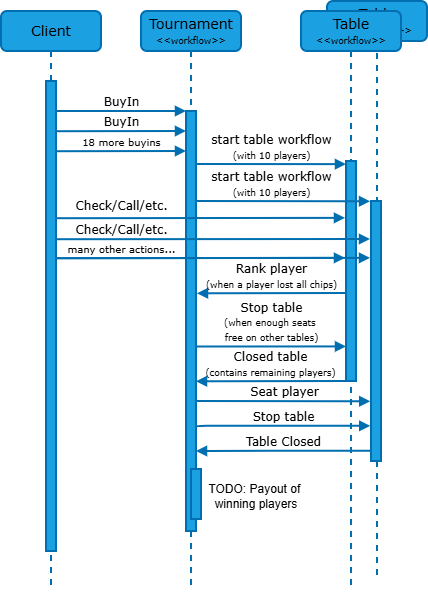
Once enough players have been ranked (lost their chips), a table can be stopped and once it’s closed any remaining players are moved to other tables. Repeating this process until the last table is closed.
Ranking of players
Zooming in on the code of an incoming signal, in this case the ranking of a player. As signaled from a table workflow.
Note that I followed the practice of capturing signals in queues and having the workflow methods itself deal with the work at the appropriate time.
private final Deque<PlayerToRank> playersToRank = new ArrayDeque<>();

@Override
public void onRankPlayer(PlayerToRank ptr) {
    playersToRank.add(ptr);
}

@Override
public void workflow(TournamentState tournamentState) {
    ...
    while (!playersToRank.isEmpty()) {
        // using the signal receive order as ranking order (counting down)
        rankPlayer(playersToRank.pop());
    }
    ...
}
The Tournament Workflow
Looking a bit deeper into the workflow method of the new Tournament workflow. It is basically responsible for handling the incoming signals from the table workflows when started and Buyins from players before the tournament has started. (Not supporting Rebuys)
It has therefore two specific states, waiting upon start and started. Each state supporting distinctly different signals/updates.
I choose to directly reflect this into the basic structure of the code.
@Override
public void workflow(TournamentState tournamentState) {
    state = tournamentState;

    while (state.getStatus() == WAITING) {
        Workflow.await(() -> incomingWaitingWork());

        while (!playersToAdd.isEmpty()) {
            addPlayerToTournament(playersToAdd.pop());
        }

        if (state.seatsFilled()) {
            startTournament(); // starts the tables as child workflows
        }
    }

    acquireTableWorkflows(); // get the long-term stubs to tables

    while (state.getStatus() == STARTED) {
        Workflow.await(() -> state.getStatus() == DONE || incomingStartedWork());

        while (!playersToRank.isEmpty()) {
            rankPlayer(playersToRank.pop());
        }
        while (!closedTables.isEmpty()) {
            handleClosedTable(closedTables.pop());
        }
    }

    Workflow.await(Workflow::isEveryHandlerFinished);
}
Obviously the client and worker registration should be updated as well to make the whole thing work again, but it is basically just more of the same seen earlier.
Starting a tournament instead of directly starting a table from the client. Acquiring stubs to all tables once the tournament has started:
if (tournamentEvent instanceof TournamentStarted) {
    int tables = ((TournamentStarted) tournamentEvent).tables();
    List<TableWorkflow> tableWorkflows = IntStream.rangeClosed(1, tables)
            .mapToObj(tableId -> client.newWorkflowStub(TableWorkflow.class,
                    String.format("%s-%s", tournamentId, tableId)))
            .toList();
    ...
}
Temporal Child Workflow support
Apart from visualizing the signals/updates and activities, looking at the history dashboard of a workflow also shows when it spawns a child workflow.
Also showing their status and running time.

Learnings so far
-
Applying the program flow from a previous event-based iteration of the logic to the temporal based workflow implementation works pretty much 1-to-1. Migration to fast queueing signal handlers again improving overall quality of the code in the process.
-
Signals are guaranteed to be fed one by one to the workflow in the order they are received and registered into the history. Being used to kafka, this again maps well to my own default metal model.
-
The visual inspecting a workflow using the Temporal dashboard is quite handy when it comes to debugging and manually confirming correctness of a workflow execution.
Next up…
Stay tuned for more to come as it is time, overdue even, to explore (unit)testing Temporal workflows as well as the first steps towards account management and financial processes like Deposit, Buy-in and Payout.
