OAuth 2.0 and OIDC Explained with UML
The purpose of Open Authorization 2.0 (OAuth 2.0) is to give an application (the "Client") limited access to your data at another service (the "Resource Server"), without having to give your password to that application. When OIDC is added Single Sign-On (SSO) is supported as well. The flow of these protocols can nicely be shown in a UML Sequence Diagram.
OAuth 2.0 with optional OIDC
Registration
Before running the Client app as depicted in de diagram below, one must register its client_id, client_secret, and
redirect URIs at the Authorization Server.
When JSON Web Key Set (JWKS) is used the Resource Server uses the public key to decrypt the JWT (JSON Web Token), which has been encrypted by the Authorization Server with its private key. Else if a symmetric key is used to encrypt the token that must have been shared by the Authorization Server with the Resourcse Server first.
The Flow
OAuth 2.0 deals with authorizations (aka. permissions). It is meant for getting the authorizations of a user (the Resource Owner) to access resources at an external Resource Server from an external Authorization Server. With 'external' meaning the Resource Server is not part of the organisation of the Client application. The authorizations are packed in an Access Token and an accompanying Refresh Token. The latter, to refresh the Access Token when it expires.
Optionally OpenID Connect (OIDC) is for authentications. It is an extension on OAuth and is used to acquire some user specific data from the Authorization Server. That data is provided via an ID Token, and can be used by the Client to verify the name, e-mail address, etc. provided by the user.
Here is an example of the roles:
| Role | Example |
|---|---|
Resource Owner |
You (the user) |
Client |
Slack |
Authorization Server |
Google Accounts / OAuth |
Resource Server |
Google Calendar API |
Switching on OIDC can be done by adding the value openid to the scope parameter (see diagram below).
For example like this:
-
OAuth 2.0 only:
scope=https://www.googleapis.com/auth/calendar.readonly-
OAuth 2.0 with OIDC:
scope=openid profile email https://www.googleapis.com/auth/calendar.readonlyDescription:
OIDC scopes:
-
openid: also use OIDC. -
profile: request standard profile info of user, like, name, photo, etc. -
email: also request the user’s email address.
OAuth 2.0 scope example:
-
https://www.googleapis.com/auth/calendar.readonly: request readonly permission for Google Calendar API.
The scopes profile and email are sometimes also added when using OAuth 2.0 only. In that case this is sometimes
interpreted by the Authorization Server as an additional request to access some user data endpoint. The Client
can then request user data with an additional call to that endpoint using the Access Token.
Depicted below is the flow of an OAuth 2.0 process with optional OIDC.
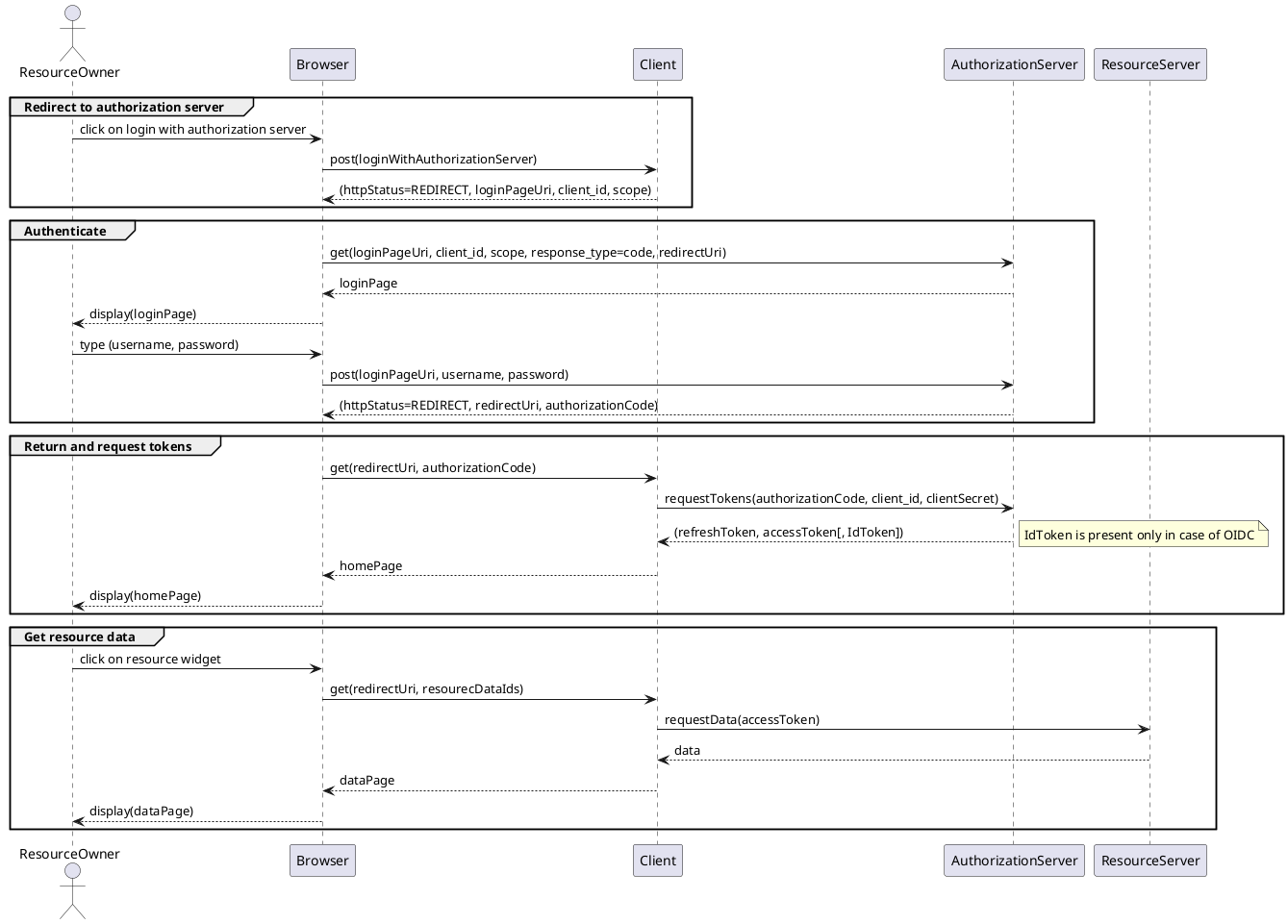
(This image was generated from these sources, see also PlantUML in AsciiDoc with Maven.)
